Computer Speakers vs Soundbars: Audio That Fits Your Desk
Compare separate desktop speakers and compact soundbars by placement, connections, controls and the way you actually use your desk.
This guide draws on published documentation and practical use cases, not hands-on testing. It contains no paid product placements or affiliate shopping links. How we work · Affiliate Disclosure
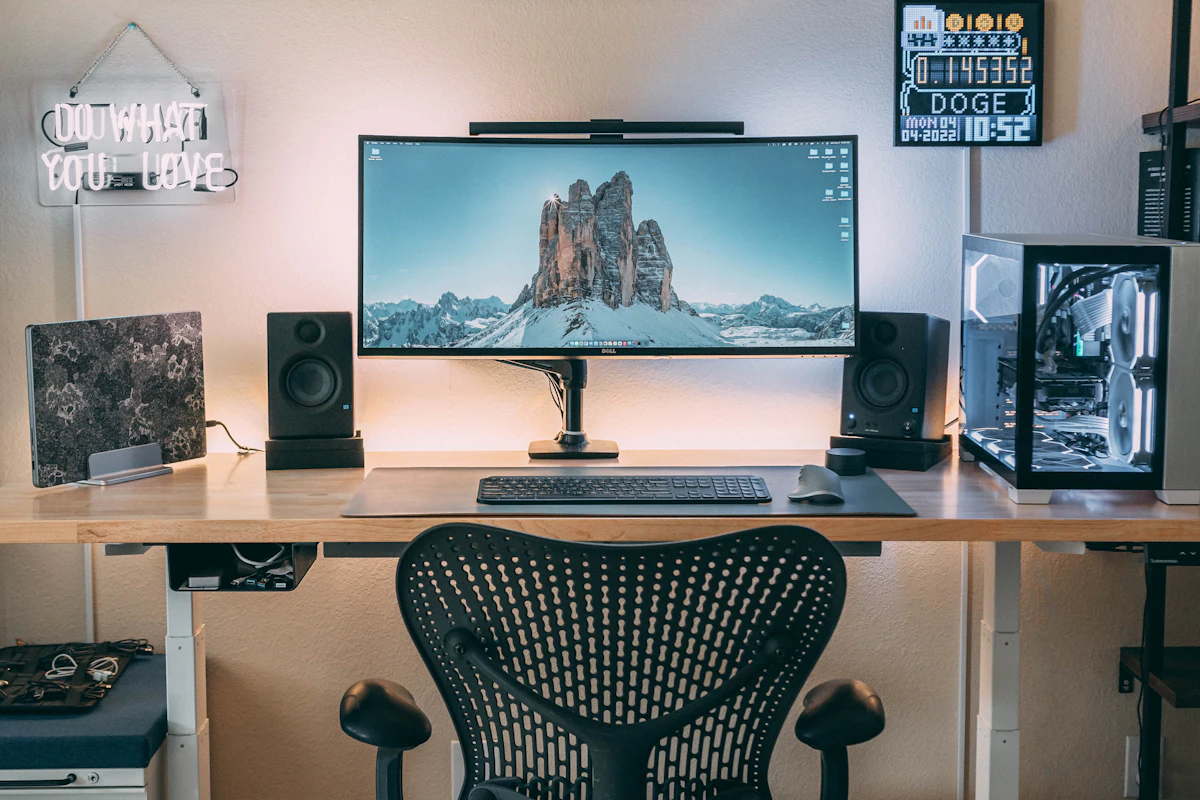
Choose the layout and input path first. Separate speakers offer placement freedom; a desktop soundbar can simplify a crowded desk.
In this guide
Your monitor sits between a lamp and a stack of notebooks. There is room beneath the screen, but almost none beside it. A soundbar looks like the obvious answer until its height blocks the bottom of the display, or its only useful input expects a television connection your computer cannot provide.
Desktop audio is a space and connection decision before it is a loudness decision. Separate speakers let you position the left and right channels around your seat. A compact bar keeps the enclosure together. Neither shape guarantees clearer dialogue, deeper bass or better performance at the quiet volume you use while someone works nearby.
Compare the layouts
| Layout | Where it makes sense | Main compromise | Check before choosing |
|---|---|---|---|
| Two powered desktop speakers | A permanent desk with space on both sides | Two enclosures and a linking cable | Speaker dimensions and accessible controls |
| Speakers with a separate subwoofer | A room where bass and floor space matter | Another box, power connection and placement decision | Subwoofer controls and cable reach |
| Compact desktop soundbar | A shallow setup with usable space below the display | Left and right drivers share one enclosure | Screen clearance and actual audio inputs |
| Television soundbar | A desk also built around compatible TV equipment | Connection and size may be awkward for a computer | Explicit PC support and ARC/eARC requirements |
These are practical tendencies, not listening scores. A thoughtfully positioned small system can suit a desk better than a larger system squeezed into the wrong places.
Start with a cardboard footprint
Measure the usable space after moving the monitor through its normal height and tilt range. Include the stand, not just the panel. Cut paper rectangles for the enclosures and leave room behind them for plugs. A bar that fits between the stand’s legs may still cover a power button or obstruct the webcam mount you use below the screen.
For separate speakers, check whether you can place one on each side without hiding either behind the display. Moving the speakers independently gives you more options for spacing and aiming them toward your seat. It does not mean spreading them as far apart as possible. A narrow work area may make a single bar the more manageable arrangement.
If a screen support is the real obstacle, our monitor arm guide helps you assess whether changing the display placement would solve it. Do that measurement before purchasing audio to fit a temporary compromise.
Trace the connection from computer to speaker
Write down the complete path: computer output, any dock or adapter, audio cable, and speaker input. Powered speakers contain amplification; passive speakers need a suitable amplifier. Do not assume a computer’s headphone socket can directly drive passive bookshelf speakers.
For a USB connection, confirm that USB carries audio. Some speakers use USB only for power and still need a separate audio cable. With an analog input, check whether the computer has an appropriate output and where you will adjust volume. A laptop docking station can change which connections remain available when the laptop is closed.
Television soundbars need extra scrutiny. A socket marked HDMI ARC or eARC is part of an audio return arrangement with compatible equipment. An ordinary HDMI output on a computer is not automatically a substitute for the television connection described in a soundbar manual. Read the supported wiring diagrams before assuming that matching plug shapes establish compatibility.
Bluetooth can make switching between a phone and a computer convenient. It also introduces pairing and reconnection behavior that a simple wired path avoids. If you edit dialogue or play timing-sensitive games, check the entire connection’s behavior rather than assuming a Bluetooth version number guarantees negligible delay.
Evaluate the controls you will touch every day
Imagine answering a call while music is playing. Can you mute the speakers immediately? Can you identify the active input? Is the volume control reachable without reaching behind a monitor? A useful physical control can matter more than a long list of sound modes.
Also check what happens after sleep or a power interruption. Does the system remember its volume and input? Does a connected phone unexpectedly take over? These are questions for the manual and the return-period check, not features to infer from photographs.
For a subwoofer system, consider the whole room. A floor enclosure can compete with your feet and cable basket. Adjustable bass is useful when the desk shares a wall with another room. More bass capability does not require using it, but paying for it makes little sense if you will keep it turned down permanently.
Who should skip an upgrade?
If you mainly attend calls in a shared room, headphones may solve your actual problem more directly. Speakers do not provide privacy, and a microphone can pick up room playback. Compare earbuds and headphones before dedicating desk space to a speaker system.
Keep existing speakers if the complaint is occasional rattling from an object beside them or an inaccessible volume setting. First remove the obstruction and confirm the output selection. Replacing hardware before identifying the inconvenience risks recreating it with a new enclosure.
FAQ
Does a soundbar always have weaker stereo separation?
No universal ranking follows from the shape. Driver spacing, processing, placement and listening distance all matter. Separate enclosures offer more physical placement freedom; that is the defensible advantage without comparative listening measurements.
Is USB always better than an analog cable?
No. USB audio avoids relying on a computer’s analog output, but overall quality and compatibility depend on the equipment. Choose a supported, manageable connection before treating the connector as a quality score.
Can one system serve my desk and my phone?
Yes, if it supports the relevant inputs and convenient switching. Verify whether switching is manual or automatic, and whether the system remembers the source you expect.
Sources and scope
References checked 2026-10-21. Placement and selection recommendations are editorial judgments, not results from comparative listening or laboratory testing.
- Sonos: television requirements for home theater speakers explains optical and HDMI ARC/eARC connection requirements.
- Logitech: computer speaker connection specifications provides an example of distinct USB, analog and Bluetooth inputs; it is a technical reference, not a product recommendation.
Keep exploring
Bluetooth Audio Adapters: Get the Direction Right
Understand transmitters, receivers, audio inputs, microphone support and pairing before adding Bluetooth to older audio equipment.
Read the guide
Earbuds vs. Over-Ear Headphones: Choose for the Hours You Actually Listen
Compare earbuds and over-ear headphones for commuting, desk calls, travel, comfort, portability, and the fit details that change everyday listening.
Read the guide
Open-Ear vs. In-Ear Earbuds: Awareness or Isolation?
Compare open-ear and sealed in-ear earbuds for home listening, commuting, shared spaces, glasses, calls, and the tradeoff between awareness and isolation.
Read the guide